Types of TV Mounts and How to Choose the Right One
TV Mounts & Mounting Service | Blog
Category: TV Mounting | Location: Miami, FL | Read time: ~5 min
Types of TV Mounts and How to Choose the Right One
By Jose A. • Founder, TV Mounts & Mounting Service • 10+ years in AV and home theater installation across Miami
The mount is the part of a TV setup that most people think about last and regret most often. I’ve been doing this in Miami for over 10 years, and the number of times I’ve shown up to fix a job where someone bought the wrong mount — or the right mount in the wrong spot — is too many to count. It’s not a complicated decision once you understand the options, but it is one worth making intentionally.
There are three main types of TV mounts used in residential installations. Here’s how each one works, when it makes sense, and how I think about choosing between them on any given job.
Fixed mounts
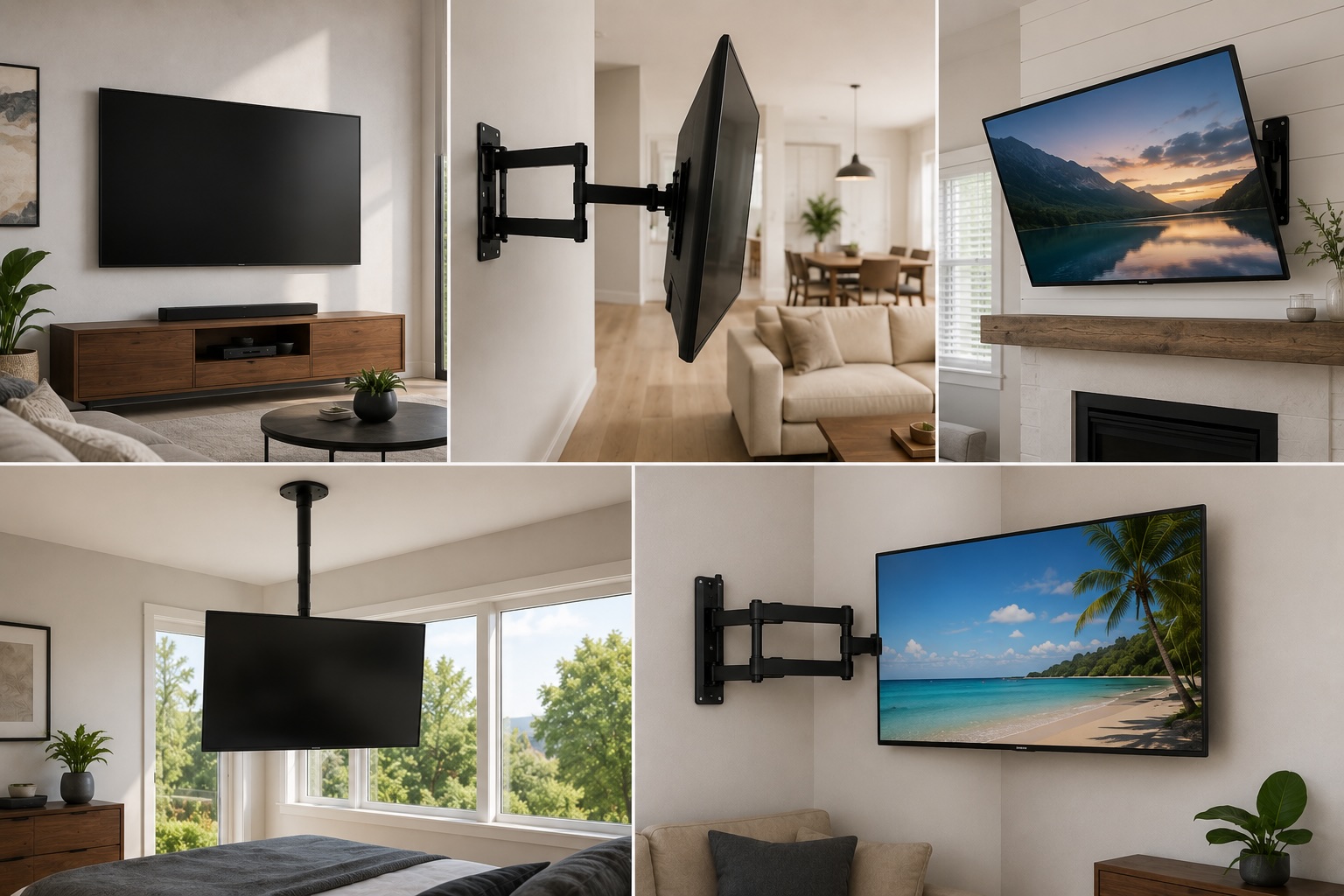
A fixed mount holds your TV flat and flush against the wall. There’s no adjustment after installation — it goes up, it stays there. The clearance between the TV and the wall is usually an inch or two, which gives it a very slim, clean profile.
This is the mount I recommend most often. For a standard living room where the seating is in front of the TV and doesn’t move around, a fixed mount is all you need. It’s the most affordable option, the easiest to install cleanly, and in the right setup it looks better than any other mount type because there’s nothing to see — just the TV on the wall.
The one real limitation is cable access. Because the TV sits close to the wall, getting behind it to swap HDMI cables or plug in a new device requires tilting or removing the TV. If you’re someone who connects and disconnects things regularly, that’s worth thinking about before you commit to a fixed mount.
I’d rather put a fixed mount in the right spot than a full-motion mount in the wrong one. The best mount for your room is the one that matches how you actually use it — not the one with the most features.
Full-motion mounts
Full-motion mounts — also called articulating mounts — let you extend the TV away from the wall, swivel it left or right, and tilt it up or down. They give you the widest range of adjustment of any mount type.
I install these most often in open-concept spaces where the TV needs to be visible from more than one area — a living room that opens into a kitchen, a great room with seating at multiple angles, or a corner wall where the natural viewing direction is diagonal. They’re also the right call for any room where the viewing position changes depending on what’s happening — someone cooking and watching from across the room, or a family room where kids watch from the floor and adults watch from the couch.
A few things to keep in mind: full-motion mounts extend further from the wall than fixed or tilt mounts, which affects how the room feels. They also require very secure installation because the extended arm creates more leverage on the wall — which matters more on concrete, common in Miami condos. And they cost more, both in hardware and installation time. None of that is a reason to avoid them when the room calls for it, but it’s worth knowing before you decide.
The mistake I see most often with full-motion mounts is people buying them because they seem like the premium option, installing them, and never adjusting them once. If your viewing setup doesn’t actually require the flexibility, you’re paying for something you won’t use.
Tilt mounts
Tilt mounts let you angle the TV up or down, but not side to side. The TV sits close to the wall like a fixed mount, but you can adjust the vertical angle after installation.
The main use case is any situation where the TV ends up higher than ideal eye level — above a fireplace, on a high wall in a bedroom, or in a room where the available wall space forces the TV up higher than you’d otherwise want it. Tilting the screen downward brings it into a more comfortable viewing angle without having to relocate the whole mount.
I install tilt mounts in almost every bedroom I work in. When you’re watching from a bed, the TV is naturally higher relative to your seated eye level than it would be from a couch. A fixed mount in that position means you’re looking slightly upward the entire time. A tilt mount corrects that without adding much complexity or cost.
One thing tilt mounts handle well in Miami specifically: glare. South Florida has more sunlight than most markets, and in rooms where windows face the TV wall, being able to adjust the screen angle can make a real difference in picture quality during the day. It’s an overlooked advantage of tilt mounts that I’ve seen solve problems that furniture rearranging couldn’t.
How I decide which mount belongs in which room
When I walk into a job in Miami, the mount decision usually becomes clear after a few questions. I’m thinking about:
Where is everyone sitting, and does that change?
Is the TV going straight onto a flat wall or into a corner?
How high up is the TV going, and will it be above seated eye level?
Is this a room with multiple viewing areas or just one?
How often will devices be connected and disconnected behind the TV?
The answers almost always point to one of three answers: fixed for a standard centered setup, tilt for anything elevated, full-motion for open-concept or multi-angle rooms. There are exceptions, but that framework covers the vast majority of residential jobs.
What else affects the decision
TV size and weight
Every mount has a weight rating and a VESA pattern — the standard spacing of the mounting holes on the back of your TV. Both need to match your TV before you buy or order anything. A mount rated for 65 inches and 80 pounds is not the right choice for an 85-inch TV that weighs 110. This is a safety issue, not just a compatibility one. We supply mounts at TV Mounts & Mounting Service, so if you’re not sure what you need, that’s not something you have to figure out on your own.
Wall type
In Miami, this matters more than in most markets. Drywall is the most common and most straightforward. But a significant number of homes and almost every high-rise condo in the city has concrete or block walls. The mount type doesn’t change based on wall material, but the installation method does — concrete requires masonry anchors and the right drilling equipment. A service that doesn’t ask about your wall type before quoting you isn’t fully prepared for the job.
Cable management
Whichever mount you choose, think through cable management before installation day. Running cables inside the wall on drywall — the cleanest option — works best when you plan for it before the mount goes up. Adding cable concealment after the fact is more work and sometimes means patching. If you know you’re going to connect a soundbar, streaming device, or game console, factor that into the cable plan upfront.
Mistakes that are easy to avoid
After 10 years of doing this across Miami, these are the ones I see most often:
Buying a mount based on price alone without checking weight ratings or VESA compatibility
Choosing full-motion because it seems like the best option without thinking through whether the room actually needs it
Mounting too high — especially in living rooms where it looks fine from across the room but causes neck strain from the couch
Ignoring cable management until after the mount is up, then dealing with a messier solution than necessary
Not accounting for glare from Miami’s natural light when deciding on placement and mount type
If you’re in Miami and you want someone to figure out the right mount for your specific setup and handle the installation in one visit, build your quote at tvmountsandmounting.com. We supply the mount, handle the installation, and manage cables — same-day appointments available across Miami-Dade.